System overview
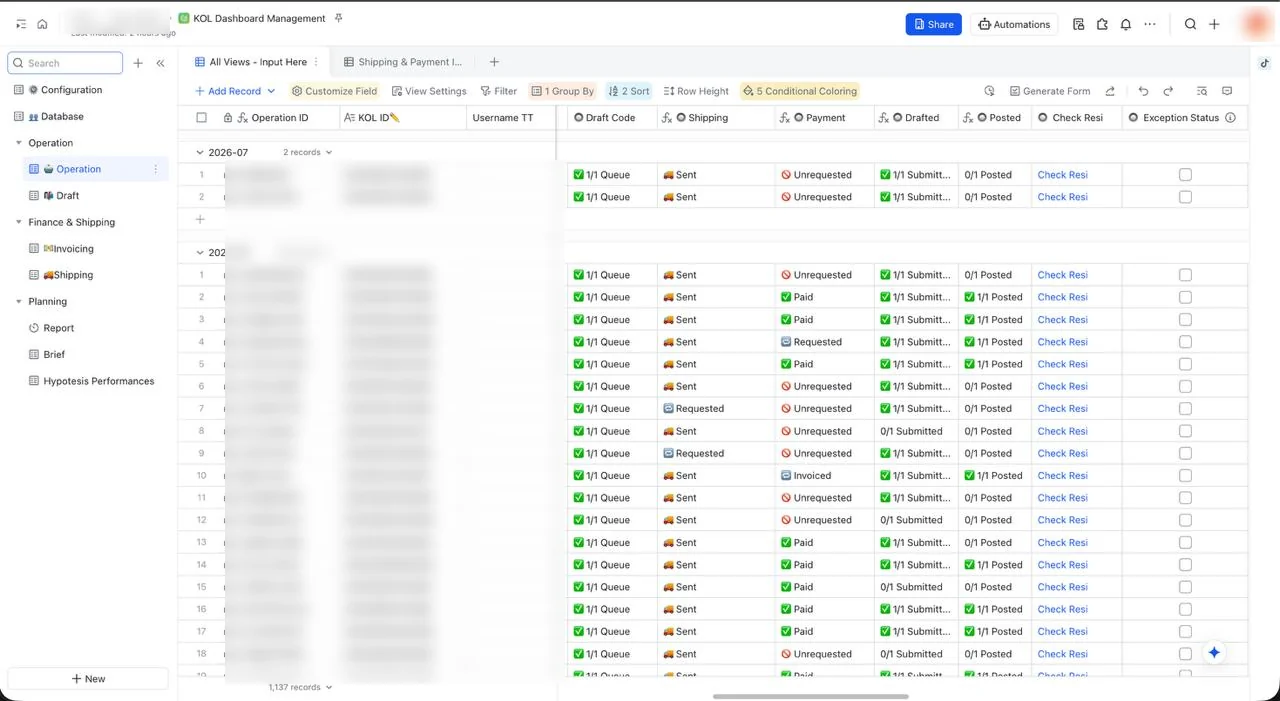
KOL Dashboard Management is a Lark Base/Bitable setup for daily KOL operations. It helps the team manage KOL records, campaign operations, briefs, drafts, posting, product shipment, invoice/payment, reconciliation, and performance reporting.
Master KOL data: profile, URLs, contacts, address, rate card, payment information, dedupe, and dealing status.
Campaign execution center per KOL. It reads many fields from Database, Draft, Shipping, and Invoicing.
Content queue, brief URL, draft URL, post URL, and content performance data.
Brief code, product, tier, brief URL, and active status.
Product shipment request and tracking: quantity, AWB, Ryan approval, and tracking link.
Payment request, invoice link, payment proof, validation, and reconciliation.
Important note: no active workflow automation was detected. Most status updates run through formulas and lookups. If a status does not move, the source data in a related table is usually incomplete.
Figure 1 — Table map
Database is the KOL profile source, Operation is the execution hub, and Draft, Shipping, and Invoicing feed status back to Operation. Dashboard Report is for monitoring, not raw data entry.
Figure 2 — Daily usage flow
Use this as the operator sequence from KOL input to reconciliation.
1. Input or update KOL in Database
- Fill clean TT URL or IG URL, Name, Niche, Skin Problem if relevant, Type, PIC, CP, CP Shipping, Detail Address, Payment Information, Rate Card, KTP/NPWP if needed, and Dealing status.
-
URL format: TikTok
https://www.tiktok.com/@username, Instagramhttps://www.instagram.com/username/. Avoid tracking parameters, queries, or unnecessary paths. - Check TT Unique or IG Unique. If Duplicate, search the existing KOL first. If Unique, continue the dealing process.
2. Create an Operation record
- Use All Views - Input Here.
- Fill KOL ID, Product, SOW, Detailed SOW, First Post on, Dealed Rate, Product Value, PIC DEAL, and Send Brief if the brief has been sent.
- Do not manually re-enter lookup data in Operation. Fix the source in Database if lookup data is wrong or empty.
3. Manage Brief
- Use briefs with Active status. Do not use Not Active or duplicate briefs for new campaigns unless specifically directed.
- Key fields: BID, PID, Product, Tier, Brief URL, and Status.
4. Manage Draft and Posting
- Track Operation ID, Platform, Product, Brief URL, Planned to Post, Draft URL, Post URL, Status, Refresh Status, and content metrics.
- Operation draft status is calculated from Draft Code, Drafted, and Posted against SOW.
- If status does not move, check Operation ID, Draft URL, Post URL, and SOW quantity.
5. Manage Shipping
- Fill Operation ID, Product 1/2/3, QTY, CP Shipping, Address, AWB, Approval Ryan, Link Check Resi, and Months Shipping.
- Status: Unrequested, Requested, Sent, Received. Add AWB after shipment and check Shipped in Operation after goods are received.
6. Manage Invoicing and Payment
- Track Operation Code, Validation, Product, Detailed SOW, Status Draft, Invoice Link, Screenshot Chat, Payment Proof, Months Payment, Nominal Payment, Nominal Deal, Status Reconcile, finance/campaign/weekly notes, and completeness approval.
- Do not check reconcile when invoice or payment proof is unclear.
7. Read Report and Hypotesis Performances
- Use Dashboard Report to monitor status and performance summary quickly.
- Use Hypotesis Performances for monthly angle/content review: Qty Content, Views, Likes, Comments, Share, Save, ER%, CPM, CPE, Budget, Winning >10K, Winning >25K, and winning rate.
- Use winning-angle insights for the next brief.
Update KOL views and engagement automatically
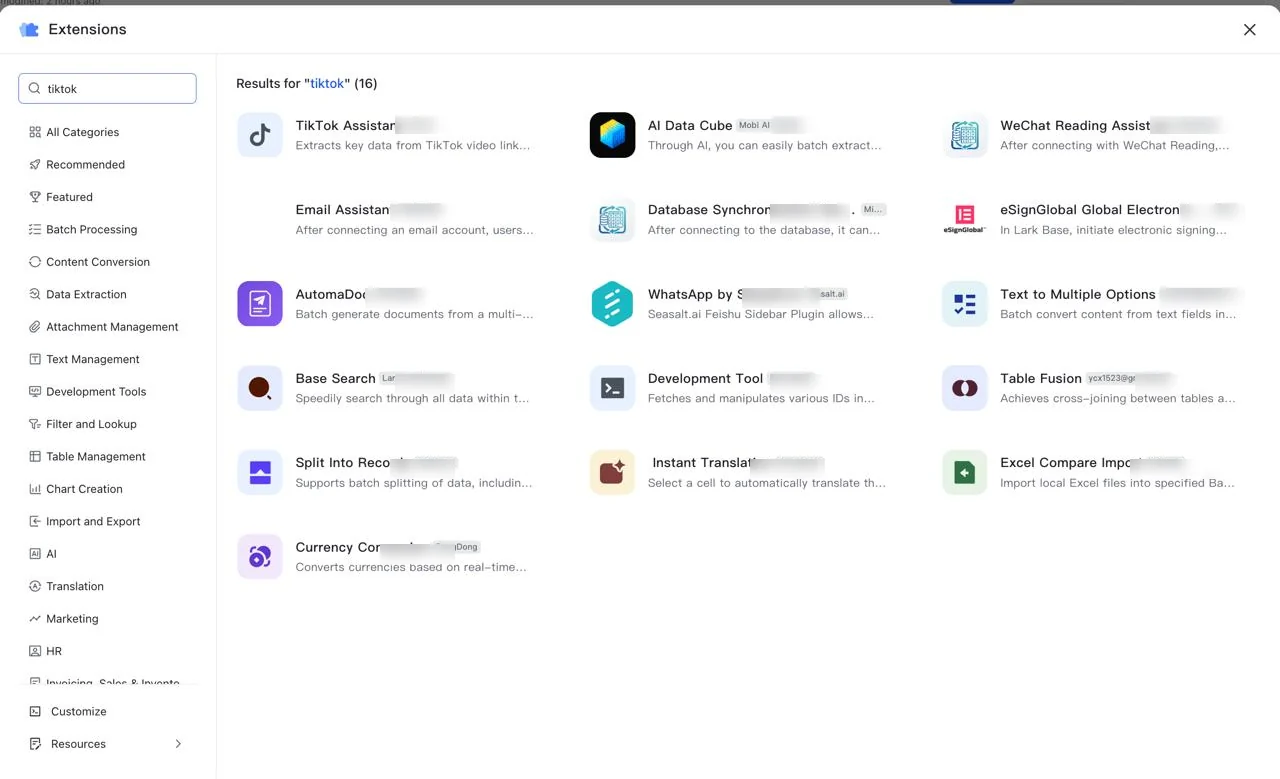
To reduce manual metric refresh, use Lark Base Extension and search for TikTok Assistant. The extension can help extract key data from TikTok video links, then use the output to update metrics such as views, likes, comments, shares, saves/collections, and engagement fields in Draft or Hypotesis Performances.
Quick setup flow
- Open Lark Base → Extensions, then search TikTok Assistant.
- Connect the Post URL or TikTok video link field from the Draft table.
- Map extracted results into View Count, Like Count, Comment Count, Share Count, Save/Collection, and available engagement metrics.
- Run refresh before reviewing Dashboard Report or Hypotesis Performances.
Note: validate several sample rows after the first setup. Automation speeds up metric refresh, but manual QA is still recommended for important posts or large campaigns.
Figure 3 — Operation status lifecycle
Shipping
- Unrequested: no shipping request yet.
- Requested: Shipping record exists, AWB is empty.
- Sent: AWB is filled, goods are not marked received yet.
- Received: Shipped is checked in Operation.
Payment
- Unrequested: no Invoicing record yet.
- Requested: record exists, invoice/payment proof is incomplete.
- Invoiced: invoice link exists, payment proof is empty.
- Paid: payment proof exists or exception status is checked.
Operator checklist
Daily checklist
- Open Database and check new KOL records.
- Make sure URLs are clean and Unique is not duplicate.
- Update Dealing status.
- For Dealt KOLs, create an Operation record.
- Fill SOW, product, first post date, dealed rate, and PIC DEAL.
- Select an active brief from Brief.
- Input Draft according to SOW quantity.
- Update Draft URL when content is submitted and Post URL when content is published.
- Create Shipping when products are sent and Invoicing when payment is needed.
- Check Operation status: Drafted, Posted, Shipping, Payment, and Status KOL.
- Review Dashboard Report and follow up items still marked Need Update Status.
Monthly checklist
- Open Operation and check Month grouping.
- Check incomplete drafts and postings.
- Check Shipping and Invoicing by month.
- Validate Waiting List Payment and Posting Reconcilliation.
- Make sure payment proof and reconcile are correct.
- Review Hypotesis Performances for winning angles.
- Update summary or insight for next month brief planning.
Quick troubleshooting
- Duplicate appears: check TT/IG URL, clean the URL, search username in Database, and do not create a new Operation until the record status is clear.
- Drafted does not move: check Operation ID, SOW, and Draft URL.
- Posted does not move: check Post URL and post quantity against SOW.
- Shipping is stuck: create Shipping for Unrequested, add AWB for Requested, and check Shipped in Operation after received.
- Payment is stuck: create Invoicing, add Invoice Link, validate Payment Proof, then reconcile after evidence is clear.
- Lookup is empty: check KOL ID and fix the source in Database; do not manually edit lookup results in Operation.